> ## Documentation Index
> Fetch the complete documentation index at: https://docs.partio.io/llms.txt
> Use this file to discover all available pages before exploring further.
# Features
> Checkpoint panels, commit badges, and how the extension discovers checkpoint data
# Features
The extension has two main features: a **checkpoint panel** injected on commit and PR pages, and **commit list badges** that annotate commits with checkpoint data.
## Checkpoint Panel
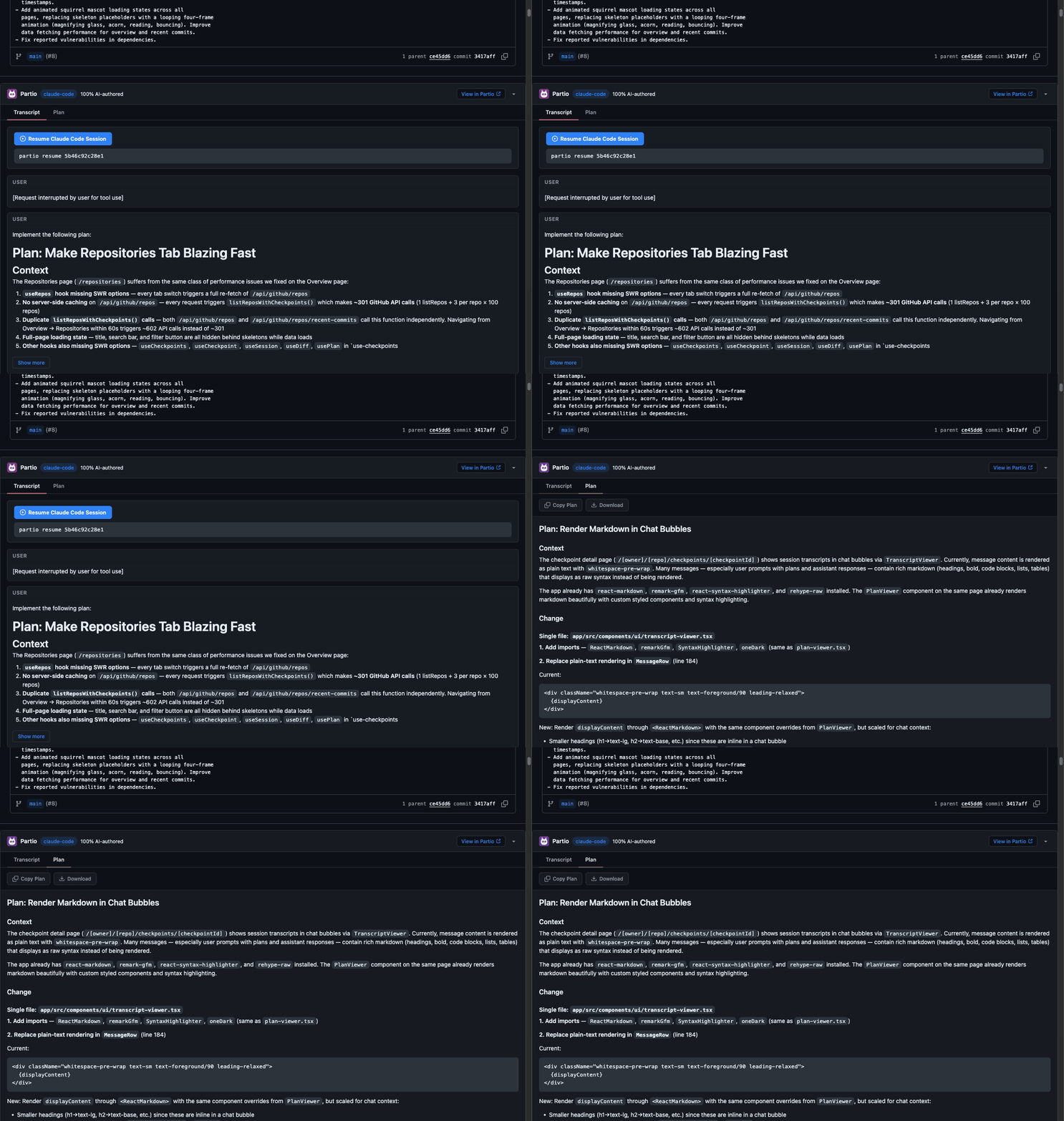
When the extension finds a checkpoint for the current page, it injects a collapsible panel into the GitHub UI.
 ### Header
The panel header is always visible and shows:
* **Partio logo** and title
* **Agent name** — a colored badge showing which agent created the checkpoint (e.g., "claude-code")
* **AI authorship** — the percentage of the commit authored by the AI agent (e.g., "75% AI-authored"), shown when greater than 0%
* **View in Partio** — link to the checkpoint detail page on [app.partio.io](https://app.partio.io)
* **Collapse button** — click the header to expand or collapse the panel body
### Transcript Tab
The transcript tab shows the agent session as a chat-style message list:
* **Messages** are grouped by role (`user` or `assistant`), each in a bordered card
* **Assistant messages** have an accent-colored left border for visual distinction
* **Tool badges** appear inline showing which tools the agent called (e.g., `bash`, `Read`, `Grep`, `Edit`)
* **Long messages** (over 1,000 characters) are truncated with a **Show more** button that toggles between the truncated and full view
* **Resume session** — at the bottom, a copyable command (`partio resume [checkpointId]`) lets you resume the Claude Code session from your terminal
The extension processes raw JSONL session data, deduplicates streaming chunks, strips internal system tags, and renders markdown in message content.
### Plan Tab
The plan tab displays the agent's plan as rendered markdown:
* Full markdown support including headings, lists, code blocks, and inline code
* **Copy Plan** — copies the raw markdown to your clipboard
* **Download** — saves the plan as a `plan.md` file
The plan tab only appears if the checkpoint includes plan data.
## Commit List Badges
### Header
The panel header is always visible and shows:
* **Partio logo** and title
* **Agent name** — a colored badge showing which agent created the checkpoint (e.g., "claude-code")
* **AI authorship** — the percentage of the commit authored by the AI agent (e.g., "75% AI-authored"), shown when greater than 0%
* **View in Partio** — link to the checkpoint detail page on [app.partio.io](https://app.partio.io)
* **Collapse button** — click the header to expand or collapse the panel body
### Transcript Tab
The transcript tab shows the agent session as a chat-style message list:
* **Messages** are grouped by role (`user` or `assistant`), each in a bordered card
* **Assistant messages** have an accent-colored left border for visual distinction
* **Tool badges** appear inline showing which tools the agent called (e.g., `bash`, `Read`, `Grep`, `Edit`)
* **Long messages** (over 1,000 characters) are truncated with a **Show more** button that toggles between the truncated and full view
* **Resume session** — at the bottom, a copyable command (`partio resume [checkpointId]`) lets you resume the Claude Code session from your terminal
The extension processes raw JSONL session data, deduplicates streaming chunks, strips internal system tags, and renders markdown in message content.
### Plan Tab
The plan tab displays the agent's plan as rendered markdown:
* Full markdown support including headings, lists, code blocks, and inline code
* **Copy Plan** — copies the raw markdown to your clipboard
* **Download** — saves the plan as a `plan.md` file
The plan tab only appears if the checkpoint includes plan data.
## Commit List Badges
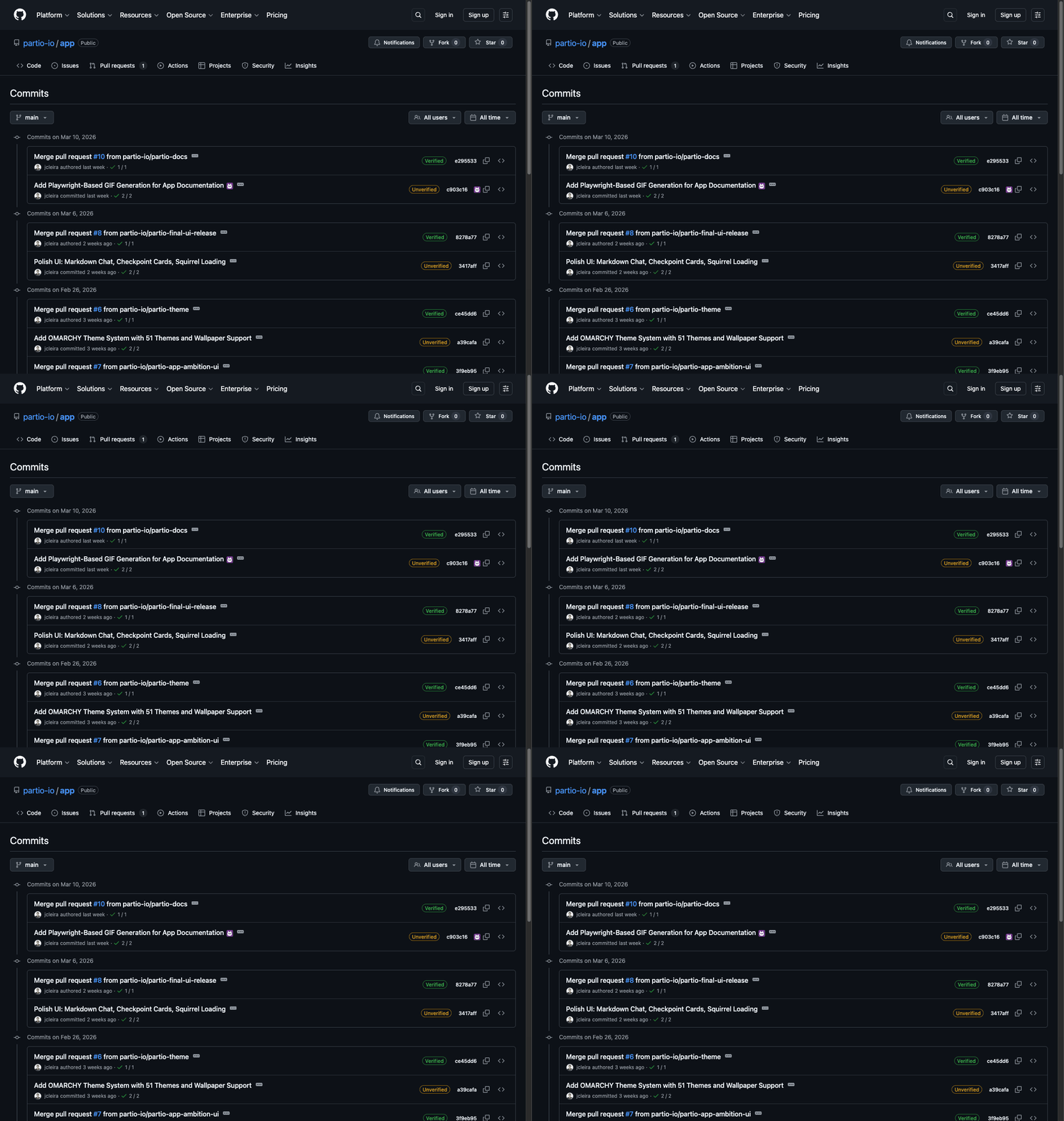 On any GitHub page that lists commits, the extension scans for commit links and annotates them with small purple Partio icons when a matching checkpoint exists.
* Badges appear after the commit link text
* **Hover** to see a tooltip with the agent name and AI authorship percentage
* **Click** the badge to open the checkpoint detail page on app.partio.io
The extension fetches all checkpoints for the repository and matches them against commit SHAs on the page, including shortened SHA prefixes.
## Checkpoint Discovery
The extension uses a multi-strategy approach to find the right checkpoint for a page:
### Strategy 1: Commit Trailers
The extension scans the commit message DOM for a `Partio-Checkpoint` trailer:
```
Partio-Checkpoint: a3f8c2d14e9b
```
If found, the checkpoint ID is used directly. This is the fastest path since it requires no API calls beyond fetching the checkpoint data.
### Strategy 2: SHA Matching
When no trailer is present, the extension gathers candidate SHAs from:
* The current commit SHA
* Parent commits
* Merged commits (for merge commits)
* Associated PR commits
It then checks each candidate against known checkpoints. Both exact matches and prefix matches (for shortened SHAs) are supported.
### Strategy 3: Branch Matching
For squash merges and other cases where the original commit SHA is lost, the extension falls back to branch name matching:
* PR head branch names
* Associated branch references
This ensures checkpoints are still discoverable even when the original commits are squashed into a new SHA.
### Discovery Order
The extension evaluates strategies in order — trailer first, then SHA matching, then branch matching — and uses the first checkpoint found. If no strategy produces a match, no panel is shown.
On any GitHub page that lists commits, the extension scans for commit links and annotates them with small purple Partio icons when a matching checkpoint exists.
* Badges appear after the commit link text
* **Hover** to see a tooltip with the agent name and AI authorship percentage
* **Click** the badge to open the checkpoint detail page on app.partio.io
The extension fetches all checkpoints for the repository and matches them against commit SHAs on the page, including shortened SHA prefixes.
## Checkpoint Discovery
The extension uses a multi-strategy approach to find the right checkpoint for a page:
### Strategy 1: Commit Trailers
The extension scans the commit message DOM for a `Partio-Checkpoint` trailer:
```
Partio-Checkpoint: a3f8c2d14e9b
```
If found, the checkpoint ID is used directly. This is the fastest path since it requires no API calls beyond fetching the checkpoint data.
### Strategy 2: SHA Matching
When no trailer is present, the extension gathers candidate SHAs from:
* The current commit SHA
* Parent commits
* Merged commits (for merge commits)
* Associated PR commits
It then checks each candidate against known checkpoints. Both exact matches and prefix matches (for shortened SHAs) are supported.
### Strategy 3: Branch Matching
For squash merges and other cases where the original commit SHA is lost, the extension falls back to branch name matching:
* PR head branch names
* Associated branch references
This ensures checkpoints are still discoverable even when the original commits are squashed into a new SHA.
### Discovery Order
The extension evaluates strategies in order — trailer first, then SHA matching, then branch matching — and uses the first checkpoint found. If no strategy produces a match, no panel is shown.